Showing posts with label learning. Show all posts

Monday, June 23, 2014

Why and Try - A Reflection

Last week, I went to iPadpalooza in Austin, TX.  While there, I learned some new things and participated in “The App-mazing Race” – a contest among participants where we had to complete various challenges and make a two-minute video.  We didn’t win anything, but it was a lot of fun!

Denise Coffin and I presented a session called “Why and Try”.  We talked about the importance of helping kids name different types of thinking and then document their progress, emphasizing that the process is more important than the product.  

In the spirit of trying new things from the conference, I have created a “Smore” – an online poster – of our session below.  Enjoy!


Sunday, September 29, 2013

"May I take your picture?" - iPad Photography in the Classroom


Last week we had another introductory lesson for iPad use with our First Grade students, which focused on taking pictures.  We started by discussing why we might need to take a photo of someone.  Perhaps the student might need an image of a person in the story he is writing.  Maybe she is creating a photo collage to demonstrate something learned.  Teachers want to have photos of students to document what is happening in the classroom.  There are so many reasons why we might need to take a picture at school.  Now with iPads in the classroom, it is ridiculously easy to take multiple photographs.

In the classroom – how do you make sure everyone is ok with the picture?  To demonstrate, the First Graders acted out several scenarios and we created a flow chart on the board. 


1. Ask the other person if you can take their picture.  If they say no – stop.  Go find another person and start over.

How often do teachers just start snapping away in class to document the activity? 

2.  If the other person says yes, take the picture, and then show it to the other person for approval.  If he doesn’t like it, retake the picture until it meets his approval.

I know as a teacher, I am often guilty of not doing this step.  When every child asks, “Can I see the picture?” I am thinking that I have 24 kids to photograph and showing each of them the picture will take time.  In reality, it isn’t too much time to show the picture and retake it if the child requests.  More often than not, children are happy with what they see!

3.  Once the picture is taken and approved, tell the other person what you are planning to do with it.  Then show them!


All of these steps may seem like very strict guidelines, but we are looking at a life lesson here.  If children can learn at this young age that they need to ask to first take then share someone’s image first, maybe then as these students get older, they will think twice before posting an embarrassing picture of their friend.

One of my goals for the year is to constantly be aware of when I am photographing the students in my class and letting them know.  I plan on telling the children that I am going to post the pictures to our class website and then showing it to them.  I was able to put this process in practice immediately as we made a grade wide movie trailer for a school assembly last week.  I had to explain to all 48 first graders what was happening, why we were photographing them and retaking several shots when students weren’t satisfied with the initial results.  It didn’t take as much time as I thought it would, and was a nice reminder to me that this is an important practice to demonstrate as we are asking the students to do the same thing.

Tuesday, May 14, 2013

Striking the Right Balance

Our 4th grade studies ancient Chinese history along with an introduction to Chinese culture and language.  We recently finished a project looking at Ancient Chinese inventions, one of which is a set of tuned bells.  2500 years ago, craftspeople in China were able to create large, beautiful sets of bronze bells that each had not one, but two tones depending on where they were struck.  There was mastery in creating the tool, and also mastery in playing it.

Our year in iPads has been like that.  We have discovered that the iPad is an incredible personal and educational tool, masterfully thought out and created.  In the hands of our children and teachers, powerful experiences are possible - but only when the device is well played.


I recently had a conversation with a concerned 3rd grade parent who had good questions about how we use iPads and valid concerns about how our program will grow in the coming years.  It dawned on me that she didn’t need a demonstration and sales pitch about the iPad itself.  What she needed was reassurance that I, as an educator who would potentially use this technology with her child, knew how to use it well.  Of course creating a host of online addicts who can’t break away from their screens to have a coherent conversation with live people at the dinner table is not on my list of goals for our 1:1 program.  But how do I enthusiastically experiment with technology while demonstrating restraint?  How do I promote our program while supporting the wisdom of moderation and limiting screen time?


It feels good to reassure parents and colleagues that, as experienced educators, we are always starting with “why” when making a decision to use or not use these devices.  We just use them frequently because as it turns out there is a lot of work to be done in 4th grade and an iPad (along with Haiku, Google Drive, and our email system) allows us to do some of that work more easily, more conveniently, and more creatively.   Of course we still draw, paint, practice handwriting, use paper, sharpen pencils, and read books because sometimes those processes are more meaningful and more effective.  As it turns out, when seeking to inspire neither digital addicts nor luddites, what feels really good is balance.  We talk about balance explicitly with our students as part of our digital citizenship curriculum so it makes sense to live it in the classroom.  


Another guiding principle in deciding who, what, where, and when about the iPads is consumption vs. creation.  We try not to consume very much on our devices in class since generally that feels passive, less worthwhile, and more like the gratuitous use people are afraid of.   You might say we don’t really like that tone so we still use paper packets and copied math homework. We could put them online, but that might not be the best use of our students' screen time.  Instead we have learned to lean toward opportunities for students to create, to choose how to express themselves, and to share and document their work.  What results are processes that are unrestrained by medium because we can choose from the best of both online and offline worlds, mixing and matching them to suit student and teacher needs.  


For our next research project on daily life in ancient China we will research using books and take notes on paper.  We will draft pieces in our writer’s notebooks then type, share and edit in google drive.  In addition to performing the resulting historical fiction monologues for each other live, students might choose to record them in iMovie or to create a Telligami video.  At this point in the year, we enjoy considering all of our options and striking a spot that hits just the right note.  


Wednesday, May 1, 2013

Learning from Setbacks

I just got back from an inspiring  presentation by Carol Dweck, author of Mindset.  In her presentation (and book, which I am thoroughly enjoying reading) Carol talks about two approaches to learning - the fixed mindset and the growth mindset. In a fixed mindset, a person believes that they have a certain amount of intelligence and that's it. In a growth mindset, a person believes that they can always learn, and if they put effort into something they will get results.  Failures do not stop people with a growth mindset.  These setbacks often spur these people on to work harder and make new discoveries.

This got me to thinking about my teaching and learning this year. This has been a huge year of growth for me personally and I have noticed that I am more reflective about my teaching.    One might say I am in a growth mindset now! 

I have been thinking about how we teach and assess children.   If we want our students to learn and grow, then we have to give them ample opportunities to try new things multiple times.  Recently, the Spanish teacher at our school started a project with the students in our class using Book Creator. After the first session with them, she came to tell us the conversations that were happening in her class as the students were creating their books in Spanish.  They weren't afraid to experiment with various things in their books and helped each other throughout the process. As she was talking about the way the children were forging ahead with the project, I couldn't help but think back to the beginning of the year and the first Book Creator books.  The students were afraid to try new things, and wanted  us to talk them through every step.  I remember thinking at this point if it was worth the effort of giving the students this experience.  It took a lot of resolve on my part to find another time for students to experience Book Creator again.  They did, several times, and each time more students felt more comfortable with their results. The ones who were willing to experiment and make discoveries seemed to generate a "can-do" attitude in the classroom.   

Listening to Carol Dweck tonight, I realize again how much impact teachers (and, of course, parents) have on the children in their lives.  If I had let my frustration and discomfort with the project affect the students' access to discoveries, they wouldn't have had the same learning experience in Spanish class.  It reinforced my belief that students need multiple opportunities and ways to show us what they know. Just because they have one setback doesn't mean that they can't learn! Thank you to Carol Dweck for your inspiring words!

Saturday, April 13, 2013

Reaching Redefinition and Nurturing Passion

The EdTechTeacher iPad Summit in Atlanta has been another wild ride through all kinds of amazing ideas for learning with iPads, and many deep thoughts about learning goals and putting students in the center of their learning. It is too soon to know what will filter out as the most significant messages from these packed two days, but there are two big ideas that immediately come to mind.

Reaching Redefinition

We met Dr. Ruben Puentedura at the Leveraging Learning Institute iPad conference in Maine in November, 2011. The conference was small and Ruben could often be found deep in thought, alone at a table. My colleague and I were relentless about sitting with him and grilling him on all the topics we could manage. We left with our heads full of information and audacious goals about elevating our integration of iPads in our classrooms.


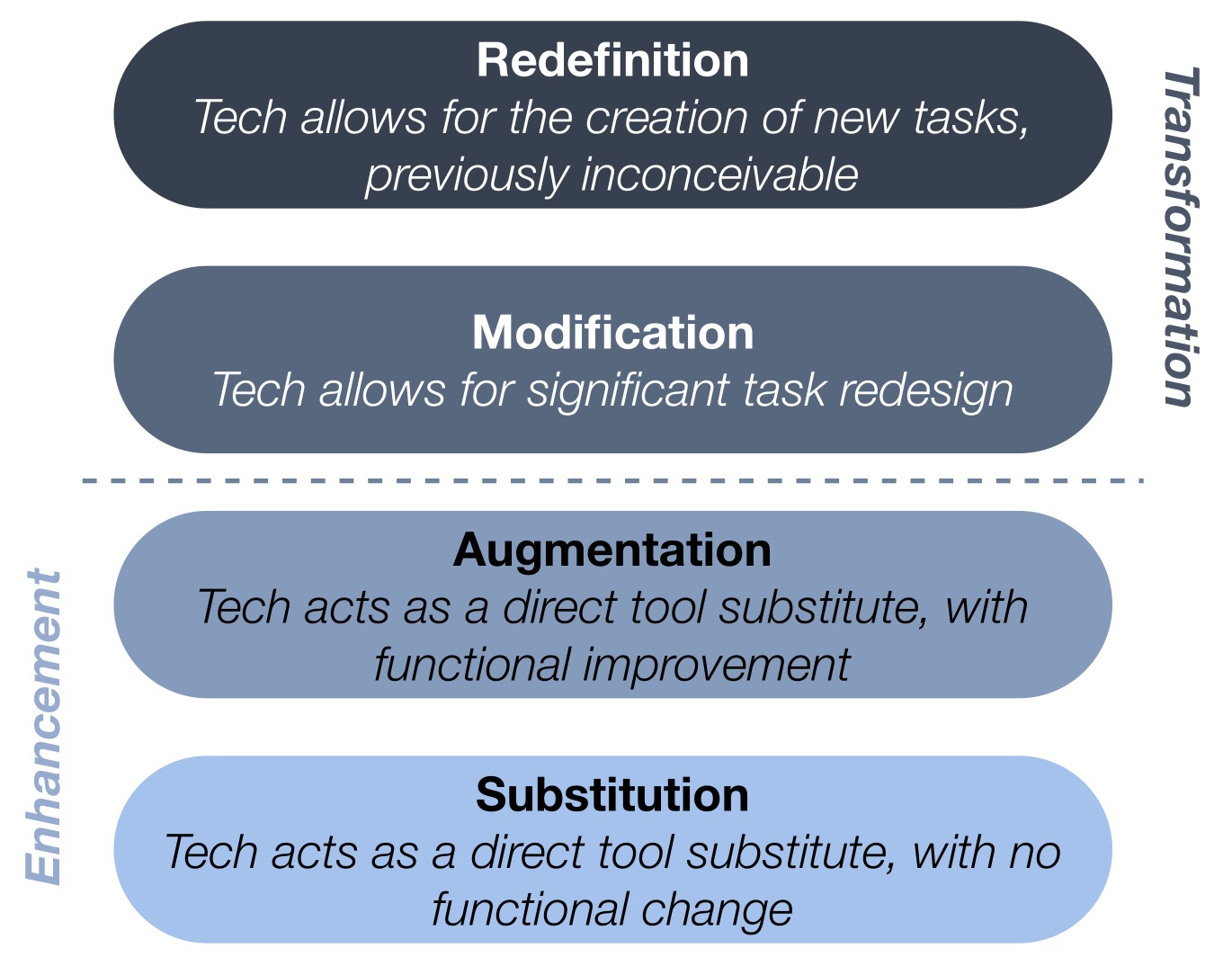
We got back to school with the SAMR model and began to look through that lens at our iPad integration. There were many examples of Substitution - students typing papers on iPads, or reading websites for research. There were some classes moving up the list to Augmentation, for instance posting materials on our Haiku pages to upload and use in a PicCollage project and Book Creator projects that include student narration and artwork. We have even reached Modification with some storytelling projects. But truly achieving Redefintion has challenged us in many ways. These types of projects are usually glorious, messy, engaging, and often unending - once you set the students loose absorb them for countless hours. iMovie trailers to teach peers to use Screen Chomp, iStopMotion projects to illustrate the growth of a redwood tree - mash ups of those and other apps in Explain Everything. Wonderful, noisy, chaotic class periods that bleed into recess and never seem to be done to the student's satisfaction. What does Redefintion lead us to? Discovering and nurturing passion!

Nurturing Passion

Angela Maiers' opening keynote, "Passion - the Difference Maker" started us out with enthusiasm for our role as educators, and empathy and appreciation for the genius in all those around us. Indeed, if we are to truly see the world as she does, then we will "honor people, always act as if the person sitting next to you has genius. Your (student or colleague) has a thought or idea that could change your life, remember that you are in the presence of genius." What would a classroom that had that belief at its heart look like? I think it would look like those crazy, messy class sessions we have had when every student was in the midst of expressing what they know, making their learning visible, using transformative tools that redefine class projects. This is passion with a purpose. Students who are allowed to act on their passions are happy, engaged and willing to take on difficult challenges as they joyously struggle to complete a project or reach a goal. When we nurture passion we redefine what it is to create and learn.

Friday, February 8, 2013

“You can put down the iPad…”


OR.... “The Right Tool for the Job.”

 Here are two great tools.  You can accomplish a variety of tasks with either tool.  However, for some jobs, neither the hammer nor the pliers is the right tool.  You can’t paint a wall with either one – that requires a different tool.


 The same idea holds true for any classroom tool, they may or may not be the right tool for every single learning goal we set forth in our classrooms.  You probably wouldn’t use blocks to teach spelling just as you likely wouldn’t use magnetic letters to teach geometry.  So why then would we pull out iPads and try to apply them to every activity in our classrooms?  The answer is:  we wouldn’t.  These are the scenarios to consider when using iPads:


  • Sometimes iPads will be the right tool for everyone

Think about the Substitution level of the SAMR model created by Ruben Putendura. 

Everyone in your class might be on iPads to do research, to write papers, etc.  This shouldn’t be the most common scenario however.  It brings to mind images of students lined up in desks, plugged into computers, consuming rather than creating or collaborating.

  • Sometimes iPads will be the right tool for some
 This is where differentiation stands out and really helps your students with varied learning styles.  Consider your students when designing projects and offer options for the finished product.  It’s really the learning that happens during the process that counts after all.  Allow students to make a movie, create a cartoon strip, record an original song, make a book, etc., to demonstrate understanding.  

  • Sometimes iPads will be the right tool for part of a project            
We love to combine paper/pencil, iPad, manipulatives to investigate an idea or deepen our thinking.  This might be a project that involves creating a book about a math concept.  Students might use a math app or watch a math video (think Flipped Classroom) to get some background content.  They might then use math manipulatives to practice/demonstrate understanding and to find complexity.  The next step could be to choose how they articulate their thinking centered around this project – some might choose an iPad path, others might choose paper/pencil.

  • Sometimes iPads might not be the right tool for anyone or any part of a project

In the end, as with any learning goal you have, it is really all about your classroom culture.  What makes sense for your teaching style?  For a given group of students? For the subject matter? For any particular project?  Consider the types of thinking/learning you wish to have your students do: consider different viewpoints, find complexity, deepen understanding, make connections, create, imagine, question, observe, or investigate.  Consider how the iPad can add a dimension to your students experiences that they would not get any other way. (redefinition, SAMR)  And then, give yourself permission to let your students find their own individuality and their own unique way of articulating their thinking/learning.

Thursday, February 7, 2013

Learning is Creation

Our team has been focusing on using mantras to focus our thinking about iPads and how we are using them in the classroom as we talk about, write about, and share our experience with others.  What's mine right now?

"Learning is Creation" 

In a previous post I wrote about "creativity" being a goal of the fourth grade one-to-one program.  When I heard or saw some iteration of the above statement at the EdTech iPad Summit in Boston, I was taken aback because though I have always firmly believed in "creativity as an essential component of learning", this sounded different.   I enjoy semantic banter from time to time so I turned the phrase over a bit in my head.    It wasn't learning is creative or learning involves creativity.  It was "learning is creation"A big theme of the conference was how the expectations for students and workers and citizens are changing. With knowledge being something of a cheap commodity these days it's much less about what you know and more about what you can do with what you know.  The models of education that are about consumption of information are becoming less useful than situations where students are given opportunities to use what they know to do something innovative.

It reminds me of the contrasts made between passive and active learning. However, it is different because I can imagine situations where students look active and are being creative, but are not necessarily producing or experiencing anything novel, new, or innovative.  An engaging lesson can still place the student in the position of the consumer if they are "doing" the ideas and processes and products of someone else.  Until they are owning one of the three, they might not be creating anything, no matter how creative the result appears.   Throughout the conference and after, I really became fixated on what types of things I had been asking my students to do, why I wanted them to do them, and what they were gaining by doing them. 

Of course a parallel thought was how could the iPad positively impact what was being done in our classroom. I ruminated on what kinds of things were bring created in our classroom and my first thoughts were pretty literal. Art, of course. Writing. And then I talked to people about it and the list grew:  understanding, ideas, opinions, perspectives, processes, problems, solutions...the list goes on. 

definitely feel that iPads are revolutionizing our class's one to one program.  Moving from netbooks to iPads means that children are engaging with the available technology in much more meaningful ways and those ways really have to do with what the devices allow our children to create. Now I see creation happening when they are use Drawing Box to design maps that show their understanding of landforms and orientation:


Or Inspiration maps to create an organized flow for their research paper:

Or when designing a process to finish a project.  Using Educreations and Explain Everything we've been making screen casting videos in math to demonstrate and record procedures and solutions.  We decided not to show them how to use either program; one of our goals was for them to design a process that allowed them to meet the objectives: make a video that shows how to solve an area and perimeter problem for a chosen rectangular object.  Include a photo, text, and your voice. Good luck!


Here the process of making the video was just as important as the math concepts.   Along the way they demonstrated an ability to measure and multiply, but they also learned to work through frustrations and create solutions to apparent and surprising problems. Following our last screen casting project using Educreations a pair of students wanted to make another screencast. They heard we had a similar program called Screen Chomp.  They asked to make a screencast showing how to use it.   These two children came in at recess to work on their project for over a week.  All of a sudden they were in iMovie filming themselves using the program.  They added credits and music and then created a trailerWe started having "production and promotion" meetings to determine an audience and possible distribution channels.  They showed it to some classmates, who pointed out a few flaws, and decided to organize their feedback using a survey created in Google Forms.  Through their own initiative, they sure have learned and taught themselves a lot.  All that they needed was the space, time, and tools to bring their ideas to life.   They are now teaching themselves Keynote so that they can teach the class how to use it, and several other students have developed projects for iStopMotion videos, book trailers, and movies to promote our upcoming class play.

Learning is creation.

Friday, November 30, 2012

Comfort Zone

For fifteen years, I was a fourth grade teacher.  I came to understand the mind-set of nine and ten year olds and still appreciate their humor, sensitivity and intelligence.  I appreciated that I could have a meaningful conversation with these children who were quickly becoming young adults.  I enjoyed reading certain books with them and delighted in finding new titles as well.  I could probably teach fourth grade math in my sleep.  It is definitely my comfort zone.  As a teacher, I was confident in what I was doing, I had a fabulous teaching partner and I enjoyed my job.  So what pushed me to switch?

I came to realize last school year that I was too much in my comfort zone.  I needed to challenge myself to do something different, really different, to energize my teaching again.  In a nutshell, that was my reason for a big change to teaching First Grade.
How does this story relate to technology in any way?  Well, I made a huge decision to go outside my comfort zone and teach a new grade.  In doing so, I have found that I am open to trying lots of new things in the classroom now that I made that initial first jump.  I think using new technology in the classroom is very similar.  Once you take the first jump (and to make a difference in your teaching, I feel it HAS to be a jump, not a small step) it gets easier and easier to keep thinking about change and challenging yourself.  
As I was planning our Social Studies curriculum this week, I kept thinking about how the iPad could enhance the students’ learning.  They could teach each other things they are learning about the community, not only through a static research report, but through photos and videos.  Other students in the class might be more attentive to a photo or video presentation, therefore holding on to more that classmates are sharing with them.
We tried this with first looking at our school community this week.  After a brief class discussion of what is important to make a school community run smoothly, the students explored our campus and took pictures of what they thought was important.  It was interesting to see what children chose to photograph – people, buildings, artwork, projects in the hall, signs – most pairs took at least 20-30 photos in a 20 minute exploration of campus.

When they returned to the classroom, the real work began.  We had a brief guided exploration of Explain Everything and they were off!  Partnerships showed in a variety of ways what is important to them with their community.  All the projects are unique and very thoughtful.  Everyone had a voice and was able to express their thoughts and opinions.  We would not have had the same results if we just had a class discussion after a campus tour.  All the children were engaged and excited and learning.  What more could a teacher ask for?
Of course, the iPad will not be present in all of our projects and presentations.  We are still working out details on paper maps, clay figures and other “traditional” first grade work.  However, I am so glad that I decided to step outside my comfort zone and see what happened.  I have had to opportunity to try, fail at some things, and get back up to try again.  By taking that first jump, it’s easy to see how we can leap to the moon.

Monday, November 19, 2012

Just back from a great iPad conference, now what?

I am in my first year of using iPads in a fourth grade classroom and have just returned from the very energizing, exciting, and information-filled Leveraging Learning 2012It is all a bit overwhelming actually. I found most of the speakers' messages seemed to revolve around the idea that it is time to change the way you teach: make learning student centered, not teacher centered. However, the school year is moving along at its usual rapid pace and I do not want to wait to experiment while I reflect on all of the big ideas (mass customized learning, SAMR model, 21st century learning, and many others). Therefore I have decided to follow the advice of one of the most inspiring presenters, Jennie Mageira. She suggested:

1. Make lots of mistakes: pick one thing you learned here and do it. She talked about how everyone who presents at iPad conferences usually has made lots of mistakes on their journey. They make it look smooth and like they know just the right ways to create wonderful learning experiences for their students, but what they do not tell you about is all of the times that their plans did not work. That was actually really great to hear.

 2. Foster teacher leadership: as you do that one new thing, write about it, tell what it is like to be at the beginning of the journey.

 3. When in doubt, ask a student: set up a student "Genius Bar", they can figure it out. She has several students play with a new app that she is thinking of using. Once they have had some time with it she has them go out to the other students in her classroom and teach them how to use it. This is allowing her students to take charge of their own learning. When my students have been working on the iPads I have noticed how quickly they figure out who can help them solve any problems that they encounter. They quickly figure out that it is usually not the teacher, more often it is a classmate.


So, as I return to my classroom, I will be busy trying my first experiment based on what I learned at the conference: to provide students feedback on their handwritten pieces by using several different apps (docAS lite and showbie). Nothing very revolutionary, but it feels like a good first step.

Sunday, November 11, 2012

iPad Summit - Not All About the Technology


Last week a group of teachers traveled to Boston to attend the iPad Summit, and since we have returned I have been asked many times, “So what did you learn?  Did you find out about some good apps?”  Refreshingly, I am able to answer that the summit was not all about apps and technology.  For me, it was about learning, how education is changing rapidly, and finally how technology can help kids and teachers achieve their goals. 

I was inspired by many speakers talking about the redefinition of learning.  Before, people went to school to get information because schools, teachers and professors held the knowledge, and schools were the place to find it.  Now, information is everywhere.  If you want to know something, there are easy ways to look it up.  Information is no longer the reason to go to school.  Schools now need to help students figure out what to do with the information.  What can you create?  How can you build on the information received?  How do we help children become resilient when faced with failure? 

The last point in many presentations was almost a side note – how does technology fit in?  It may seem odd that technology was not the main event, but I think that was the point these innovators in education were trying to make.  Don’t use technology because someone in your school bought iPads for student use.  If that is your reason for using them, then perhaps you should leave the iPads in the closet.  However, if you see a student struggling, and technology can help that student share their thinking, then embrace it!  If you can see that students have a different way to show what they are learning, by all means, again, embrace the technology.  In a profession where most teachers are used to having a level of control over what happens in the classroom, it can be a scary proposition.  How can teachers let go and trust that the students will fly?  That is the change in our school culture that we need to embrace if we want our students to become the leaders and innovators of tomorrow. 

I want to thank Tony Wagner, Greg Kulowiec and the many other presenters in Boston that challenged me last week to really think about the way I interact with students and bring out the best them!

Tuesday, September 27, 2011

iPads as table easels

A new idea!


This week the iPads came in extremely handy as we used them in a brand new way - something we did not anticipate using iPads to accomplish. The children were asked to copy something from one easel we had in the room. (a weekly activity) Since the children are spread out at various tables, they usually need to wait for the easel to "travel" to their table in order to take their turn copying down a message.
We decided to use the iPads to make the easel work more accessible to all the children. We took a picture of the easel on a number of iPads and set the iPads in front of those children who weren’t in direct eyesight of the easel. This helped us manage our children and our time in a much better way! Everyone got to work on the project simultaneously. As a class, we were able to finish earlier than we normally would and move onto our next activity.
The iPads could be used as this type of table easel for almost anything that requires student examination. We'll likely use this same idea for art discussions, community meetings, word wall words, etc....
Below is an example of our students using the iPads as individual easels: