Tuesday, September 17, 2013

Guided Discovery #1: Not Your Mother’s iPad

This year we are rolling out 1-to 2 iPads in K and 1, and 1-to-1 iPads in grades 2, 3, and 4. In each class I have the opportunity, during the critical first six weeks of school, to create expectations for how the iPads are seen and treated by kids. With two years of iPads to reflect on, my goal is to give the students full credit for what they already know about iPads, while making sure that the difference between a school iPad and a home iPad is established.

Not Your Mother’s iPad

In our first session, we talked about how this iPad is a classroom tool with apps that will help them create and share work for their classes. It’s not the iPad your mom hands you when the food is late at the restaurant, or you’re bored in the backseat. While your mom’s iPad might have games on it, and she might let you do whatever you like, the school iPad has apps carefully chosen by your teachers and you will use them for projects in school.

Encouraging Students to Discover and Share

Next, I drew an outline of an iPad, with our iBallz “case” and asked them to help me fill in the blanks. I decided to do this intro “old school” - on an old-fashioned white board or chart paper. This way our work could stay around for students to look at for a while. I asked students to tell me what was missing from the picture. As they came up and added things, we named them, and talked about what they did. An example is the “home” button, that has many jobs and many names. I left it up to the class to decide what to call it, although my personal favorite is “belly button”. After a few important additions were made to the drawing, I invited the students to take their iPads and spend three minutes exploring them without opening any apps. They were charged with finding three things to share they thought others might not know.

The exploration time helped students who were not as familiar with the iPad share discoveries and feel empowered by them. Depending on the group, we learned gestures, how to manage open apps, and how to use the search feature. When we added the battery symbol and % we were able to mention that when the battery is at 20% students should ask the teacher to charge their iPad at the end of the day. Many small details like that came out in this discussion that should help everyone feel more confident later.

The final drawing looked something like this:


After this, we guided students through using the camera app to take a photo of themselves with the front camera and set it as their lockscreen. Although the student’s name is on the back of the iPad, it is helpful to be able to press the home button and see the owner’s face as well.

Last but not least, we practiced putting the iPads away properly and making it clear that each of them is responsible for doing this well. The second session is about photos and how we establish class norms for photo-taking that everyone is comfortable with.

Tuesday, May 14, 2013

Striking the Right Balance

Our 4th grade studies ancient Chinese history along with an introduction to Chinese culture and language.  We recently finished a project looking at Ancient Chinese inventions, one of which is a set of tuned bells.  2500 years ago, craftspeople in China were able to create large, beautiful sets of bronze bells that each had not one, but two tones depending on where they were struck.  There was mastery in creating the tool, and also mastery in playing it.

Our year in iPads has been like that.  We have discovered that the iPad is an incredible personal and educational tool, masterfully thought out and created.  In the hands of our children and teachers, powerful experiences are possible - but only when the device is well played.


I recently had a conversation with a concerned 3rd grade parent who had good questions about how we use iPads and valid concerns about how our program will grow in the coming years.  It dawned on me that she didn’t need a demonstration and sales pitch about the iPad itself.  What she needed was reassurance that I, as an educator who would potentially use this technology with her child, knew how to use it well.  Of course creating a host of online addicts who can’t break away from their screens to have a coherent conversation with live people at the dinner table is not on my list of goals for our 1:1 program.  But how do I enthusiastically experiment with technology while demonstrating restraint?  How do I promote our program while supporting the wisdom of moderation and limiting screen time?


It feels good to reassure parents and colleagues that, as experienced educators, we are always starting with “why” when making a decision to use or not use these devices.  We just use them frequently because as it turns out there is a lot of work to be done in 4th grade and an iPad (along with Haiku, Google Drive, and our email system) allows us to do some of that work more easily, more conveniently, and more creatively.   Of course we still draw, paint, practice handwriting, use paper, sharpen pencils, and read books because sometimes those processes are more meaningful and more effective.  As it turns out, when seeking to inspire neither digital addicts nor luddites, what feels really good is balance.  We talk about balance explicitly with our students as part of our digital citizenship curriculum so it makes sense to live it in the classroom.  


Another guiding principle in deciding who, what, where, and when about the iPads is consumption vs. creation.  We try not to consume very much on our devices in class since generally that feels passive, less worthwhile, and more like the gratuitous use people are afraid of.   You might say we don’t really like that tone so we still use paper packets and copied math homework. We could put them online, but that might not be the best use of our students' screen time.  Instead we have learned to lean toward opportunities for students to create, to choose how to express themselves, and to share and document their work.  What results are processes that are unrestrained by medium because we can choose from the best of both online and offline worlds, mixing and matching them to suit student and teacher needs.  


For our next research project on daily life in ancient China we will research using books and take notes on paper.  We will draft pieces in our writer’s notebooks then type, share and edit in google drive.  In addition to performing the resulting historical fiction monologues for each other live, students might choose to record them in iMovie or to create a Telligami video.  At this point in the year, we enjoy considering all of our options and striking a spot that hits just the right note.  


Wednesday, May 1, 2013

Learning from Setbacks

I just got back from an inspiring  presentation by Carol Dweck, author of Mindset.  In her presentation (and book, which I am thoroughly enjoying reading) Carol talks about two approaches to learning - the fixed mindset and the growth mindset. In a fixed mindset, a person believes that they have a certain amount of intelligence and that's it. In a growth mindset, a person believes that they can always learn, and if they put effort into something they will get results.  Failures do not stop people with a growth mindset.  These setbacks often spur these people on to work harder and make new discoveries.

This got me to thinking about my teaching and learning this year. This has been a huge year of growth for me personally and I have noticed that I am more reflective about my teaching.    One might say I am in a growth mindset now! 

I have been thinking about how we teach and assess children.   If we want our students to learn and grow, then we have to give them ample opportunities to try new things multiple times.  Recently, the Spanish teacher at our school started a project with the students in our class using Book Creator. After the first session with them, she came to tell us the conversations that were happening in her class as the students were creating their books in Spanish.  They weren't afraid to experiment with various things in their books and helped each other throughout the process. As she was talking about the way the children were forging ahead with the project, I couldn't help but think back to the beginning of the year and the first Book Creator books.  The students were afraid to try new things, and wanted  us to talk them through every step.  I remember thinking at this point if it was worth the effort of giving the students this experience.  It took a lot of resolve on my part to find another time for students to experience Book Creator again.  They did, several times, and each time more students felt more comfortable with their results. The ones who were willing to experiment and make discoveries seemed to generate a "can-do" attitude in the classroom.   

Listening to Carol Dweck tonight, I realize again how much impact teachers (and, of course, parents) have on the children in their lives.  If I had let my frustration and discomfort with the project affect the students' access to discoveries, they wouldn't have had the same learning experience in Spanish class.  It reinforced my belief that students need multiple opportunities and ways to show us what they know. Just because they have one setback doesn't mean that they can't learn! Thank you to Carol Dweck for your inspiring words!

Saturday, April 13, 2013

Reaching Redefinition and Nurturing Passion

The EdTechTeacher iPad Summit in Atlanta has been another wild ride through all kinds of amazing ideas for learning with iPads, and many deep thoughts about learning goals and putting students in the center of their learning. It is too soon to know what will filter out as the most significant messages from these packed two days, but there are two big ideas that immediately come to mind.

Reaching Redefinition

We met Dr. Ruben Puentedura at the Leveraging Learning Institute iPad conference in Maine in November, 2011. The conference was small and Ruben could often be found deep in thought, alone at a table. My colleague and I were relentless about sitting with him and grilling him on all the topics we could manage. We left with our heads full of information and audacious goals about elevating our integration of iPads in our classrooms.


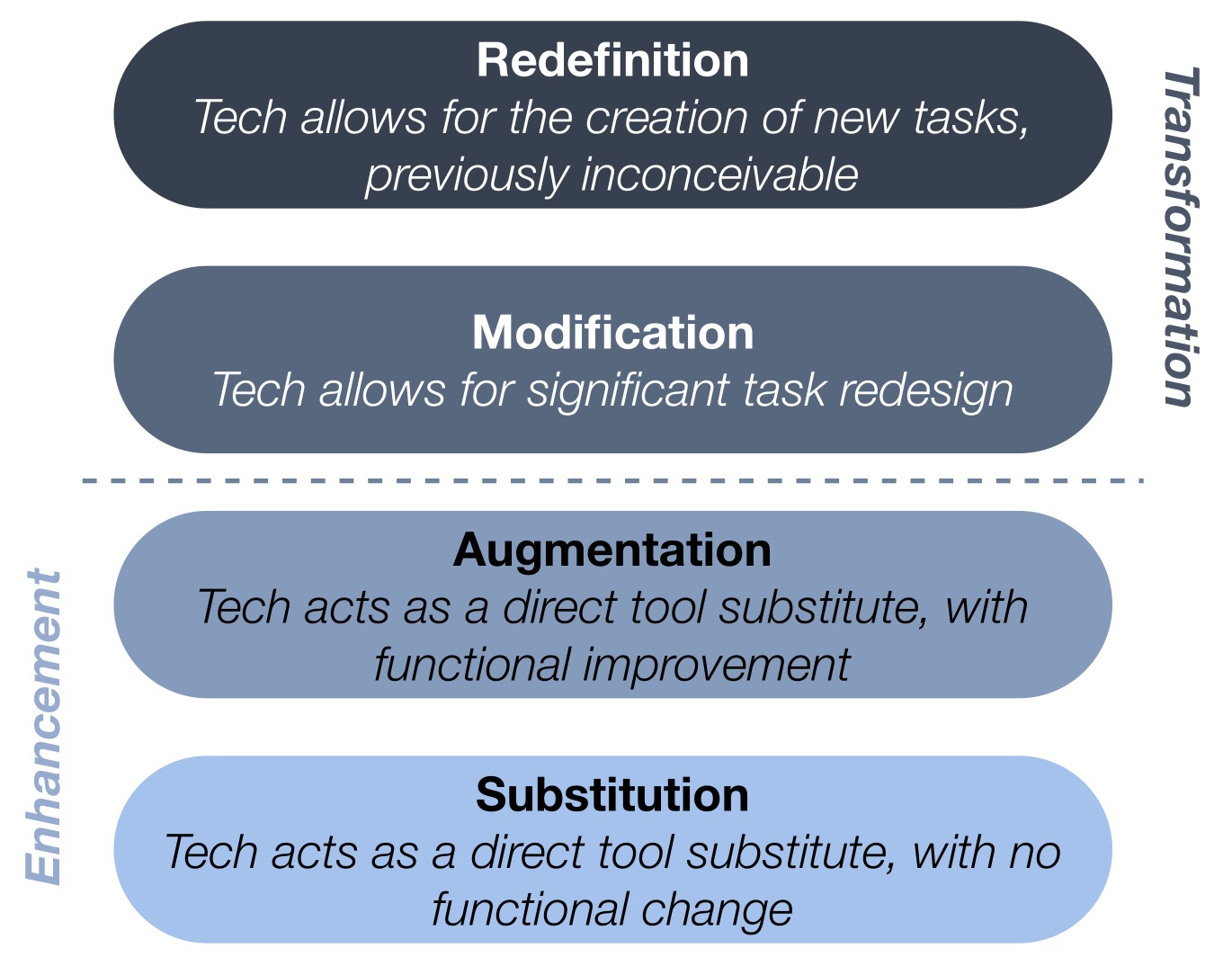
We got back to school with the SAMR model and began to look through that lens at our iPad integration. There were many examples of Substitution - students typing papers on iPads, or reading websites for research. There were some classes moving up the list to Augmentation, for instance posting materials on our Haiku pages to upload and use in a PicCollage project and Book Creator projects that include student narration and artwork. We have even reached Modification with some storytelling projects. But truly achieving Redefintion has challenged us in many ways. These types of projects are usually glorious, messy, engaging, and often unending - once you set the students loose absorb them for countless hours. iMovie trailers to teach peers to use Screen Chomp, iStopMotion projects to illustrate the growth of a redwood tree - mash ups of those and other apps in Explain Everything. Wonderful, noisy, chaotic class periods that bleed into recess and never seem to be done to the student's satisfaction. What does Redefintion lead us to? Discovering and nurturing passion!

Nurturing Passion

Angela Maiers' opening keynote, "Passion - the Difference Maker" started us out with enthusiasm for our role as educators, and empathy and appreciation for the genius in all those around us. Indeed, if we are to truly see the world as she does, then we will "honor people, always act as if the person sitting next to you has genius. Your (student or colleague) has a thought or idea that could change your life, remember that you are in the presence of genius." What would a classroom that had that belief at its heart look like? I think it would look like those crazy, messy class sessions we have had when every student was in the midst of expressing what they know, making their learning visible, using transformative tools that redefine class projects. This is passion with a purpose. Students who are allowed to act on their passions are happy, engaged and willing to take on difficult challenges as they joyously struggle to complete a project or reach a goal. When we nurture passion we redefine what it is to create and learn.

Friday, March 22, 2013

Spy vs Spy - Digital Sharing in the iPad Classroom


Last Friday a fourth grade parent received an email from her son with the subject line "Mrs. ****'s Due!" In the body of the message was a photo of the teacher in question, taken (according to the time stamp on the email) during a math lesson. The parent forwarded the message to the teacher, wondering if this was an announcement of an expected arrival. Actually, it was a misspelling of 'Do as in Hairdo.

However innocent the message and intention, we welcomed the unexpected teachable moment that gave context to the usual digital citizenship lectures. It also made us realize that the combination of email, cameras, videos, and an online connection on the iPad offers fertile ground for all sorts of sharing right from the classroom. While I have worked with these students since First grade on topics such as not sharing personal information about yourself, your friends, or your family, and not spreading rumors, jokes, or inappropriate comments via email, none of those discussions came to mind when our student snapped the photo and sent it to his mother. There is no single inoculation for poor decision making about digital sharing. The message must be framed and reframed - and ideally put into a recognizable context. For this reason, the incident was a gift.


I  prepared a simple Prezi, and called a fifteen minute meeting which began with a game of telephone. I whispered "Miss Cunningham sure is wearing worn out shoes!" to the closest student. As the rumor was passed around the circle the game was clearly doing its job. Looks of confusion, but a willingness to pass the rumor along kept it going until the big reveal - of nonsense. We talked about rumors and how often they are passed without any question as to their verity, but how if they are in the classroom at least they are staying in the classroom. I then showed the slide with the actual sentence and my own worn out shoes. This brought the conversation about how far this comment, combined with a photo, might go without the knowledge of the subject (or victim as the case may be.)


iPads offer so many ways to share, and their online connection and easy email are part of their appeal in the classroom. Our students frequently take photos to use in projects, yet now I have asked each classroom to create an agreement among themselves about asking permission before we photograph each other and a mutual understanding about how that photo will be used. We found that we, the teachers, had to explain and apologize for eagerly taking photos and videos of the classes at work. Although we have permission from parents to share images of children, we hadn't thought about the importance of modeling asking permission from the children themselves. 

I am glad to discover the power of the short, focused discussion on a topic we often save for one big lecture that is overloaded with subtopics and too much detail. My goal is to create a variety of these simple conversations on topics based on our own experiences - a homegrown reality-based digital citizenship curriculum. To that end, the Prezi I shared is available to be copied and edited for use elsewhere. The iPad, while a potential liability where sharing is concerned, is offering great opportunity for us to think about what is important and help shape good habits of thought for our students about their digital lives.


Tuesday, March 12, 2013

A Few Problems, Many Solutions

At this point in the year, the iPads are pretty integrated into our class's curriculum and daily routines.  We have prioritized exploring what we call "creativity apps" as opposed to games and apps with a singular focus.  Meanwhile in math, our class has begun utilizing Exemplars problems and rubrics to further student problem solving, math thinking, and math communication (see Merry Melvin's previous post for more on assessment).  Each problem is rich with multiple questions, levels, and solutions, and our students are finding them appropriately challenging.  We gave them free range to decide how to present their work.

Here are some solutions from the one about predicting the number of Sweethearts in a box:


And the one about planning the sleeping arrangements for class camping trip:


And our most recent problem about carpeting a basement:


Each solution requires a written explanation and a visual representation.  Some students decide to use the iPad to prepare both.  Some students use different apps depending on what they are being asked and some have a favorite they choose consistently.  Some students create their graphs and diagrams using physical materials such as Base Ten blocks or  tiles or puff balls and then document or enhance them by importing a photo.  Some students are comfortable emailing us their work and some students prefer working offline and turning in physical products.  We remain open to all of their preferences and meet them in their comfort zone.

While it was no surprise that many students elected to use their iPads to prepare their final solutions we were fascinated by the range of apps children chose.  Through regular explorations and many months of projects, Drawing Box, AiWriter, Educreations, Explain Everything, Keynote, and Inspiration Maps have become familiar friends. Left to their own devices, students have to decide whether the iPad and our creativity apps are the "right tool for the job" and which tool will serve them best.

Of course we do have some students who insist that the iPad is the best tool for them and it's really not .  But after a few experiences of being distracted and not completing their work on time, they learn that lesson too and change tactics.  At the beginning of the year, we set a few goals for our 4th grade 1-1 iPad program and progress is visible on many fronts.  To me, these are examples of students taking charge of their learning and our classroom becoming a place that fosters and supports creativity, independence, differentiation, and meaningful assessment.

Wednesday, March 6, 2013

Resolve to be more Interested, less Interesting

The NAIS Annual Conference just took place in Philadelphia and we were once again amazed and overwhelmed by the brilliant speakers and rich, inspired dialogues with our colleagues. As I left by car for a weekend in Ottawa (another story), the many messages began to sift through my mind and resolved in one thought that has been raised to the level of "mantra" over the last few days. This came from Pat Bassett, outgoing NAIS President:

Resolve to be more interested, instead of trying so hard to be interesting.

His thought came in reference to what he's come to realize over the years, and I recognized it immediately as the natural evolution of my previous "mantra" from the Singapore schools: Teach less, learn more. 

Teach Less, Learn More - Exploration vs Explanation
I was inspired by Tom Daccord's reference at the EdTechTeacher iPad Summit to this goal for teachers in the Singapore school system. I realize that when I teach students or teachers to integrate technology into their schoolwork I have often started from a "I'm going to show you how to use this" stance. That approach puts me in front of the group, showing, demonstrating, and then turning it over to the class to try all those steps out. Inevitably I find students and teachers alike assume that they can only proceed to the next step with my permission, or they are defeated by the overwhelming prospect of tackling the project solo and never feel the confidence to work on it outside of my class.

This year, with iPads being used daily in classrooms, we changed our approach from showing and explaining apps and assigning specific apps to projects, to giving students (and teachers!) a dedicated time to explore and discover apps, share what they have learned with each other, and thus build a community of resources in every classroom. As students have explored the apps, we have all learned surprising things about them, which in turn, has helped teachers feel more confident about implementing them. When teachers build in the exploration time before a project is launched, it helps with iPad management, because students can openly share their enthusiasm, knowledge, and creative ideas in a free-wheeling format where sudden discoveries are encouraged. Once the apps are explored, many of our teachers have been willing to present the plan and purpose of the project, and let the students choose the app(s) to use to fit their own vision. Best of all, it is way more fun to explore and learn from each other than to be the fount of all knowledge!

Resolve to be more interested, less interesting
I love this transmutation of the previous idea. What if we, as teachers, spent less time sharing what we know and assuming that what we know is the most interesting thing our students (or colleagues, friends, family, etc!) will ever hear. What if class time was organized around learning from our students about their interests, letting them share what they are learning, with a focus on collaboratively discovering new information. What if we let students take charge of their learning in more ways than just which desk or table they work at? What if we spent more time learning from our colleagues, taking turns, and respecting each other's knowledge and experiences, across all the disciplines? What would it feel like to invest part of every day to actively listening, responding authentically, and using what we learned to create a richer teaching and learning experience for the whole school?

These thoughts are going to be rolling around in my head for a long time to come. I'm interested to hear what all of you are thinking!